
Reporting Web App is available HERE
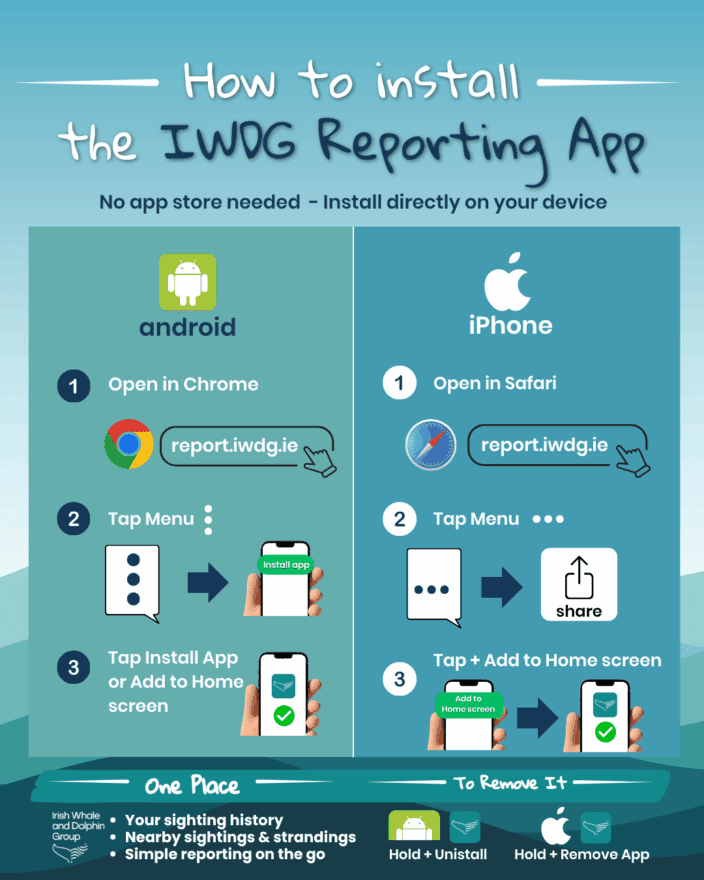
Before you Start: Remove the older IWDG reporting app. It is a teal coloured icon with a white fluke with “IWDG” caption. The new App has the same icon but with caption “IWDG Reporting”
- On Android (Chrome, Samsung Internet, Edge)
- Open the app in your browser
- Tap the menu (⋮)
- Select “Install app” or “Add to Home screen”
- Confirm to install
Note: Some devices may show a Google Play Protect message — you can still continue or simply use the app in your browser.
- On iPhone / iPad (Safari only)
- Open the app in Safari
- Tap the Share icon
- Select “Add to Home Screen”
- Tap Add
How-To Videos
-
Introduction, Downloading and Installing
-
How to Report a Sighting
-
How to Report a Stranding
-
How to Create an Effort Watch
Enabling Location Permissions
The app requires location permissions to allow you to accurately set observer and animal positions. Without this, the app will not be able to detect your location or record positions correctly. Location permissions need to be enabled at a device level before the app can access them. Please follow the instructions below for your device.
For Android
- Open Settings and tap Location — make sure it is turned on
- Open Chrome and tap the three dots (⋮) in the top right corner
Tap Settings > Site Settings > Location - Make sure location is not blocked, then find report.iwdg.ie and set it to Allow
- Return to the app and reload the page — tap Allow if a location prompt appears
For IOS (iPhone & iPad)
There are several layers of location permission on iOS — please check each one.
- Turn on Location Services
Go to Settings > Privacy & Security > Location Services and make sure the toggle is green (ON). - Allow Safari to use your location
- Still in Settings > Privacy & Security > Location Services, scroll down and tap Safari Websites. Set it to “While Using the App”.
- Allow the website itself
Go to Settings > Safari > Location. If report.iwdg.ie appears with “Deny”, tap it and change it to “Allow”. - Reload the app. Open Safari, go to report.iwdg.ie, and tap Allow if a location prompt appears.
- If you have the app saved to your Home Screen. Go to Settings, scroll down to report.iwdg.ie in the app list, and set Location to “While Using”.
About the app
The IWDG Reporting App is designed for a wide range of users including citizen scientists, researchers, boat operators, and wildlife enthusiasts.
By making reporting faster and more accessible, the app helps ensure that valuable data is collected and shared efficiently, supporting the protection and understanding of Ireland’s cetaceans.
With thanks to our sponsors The Sustainable Fisheries Community. Find out more at www.sustainablefisheriescommunity.ie
Acknowledgements
The original IWDG Reporting App was developed with support from Clare Local Development Company through the LEADER Programme, with additional functionality funded by the Irish Environmental Network (IEN).
The redevelopment of the IWDG reporting system has been supported through the Sustainable Fisheries Community (SFC) fund, an initiative associated with the North Irish Sea Array (NISA).
The SFC fund supports projects that enhance marine biodiversity recording, promote sustainable marine environments, and support coastal communities.